
The Proof is in the Pixels: Field Work Use Cases Requiring Timestamped & Location-Tagged Photos
When frontline employees use standard mobile cameras to capture field data, it creates two major challenges: a lack of verifiable proof (when, where, and by whom was this photo actually taken?) and a data leakage nightmare (sensitive enterprise assets landing on personal camera rolls and/or unencrypted cloud backups).
Across industries, the requirement isn’t just to "take a picture"—it is to capture verifiable, immutable evidence. Adding hardcoded, visible timestamps and precise GPS metadata to media transforms an image from a subjective snapshot into a legally defensible asset.
Here is a look at the core industrial use cases driving the need for geotagged media—and how CAPTOR® by Inkscreen delivers a seamless, secure solution.
Four Field Work Use Cases Where Timestamps & Location Tags Are Mandatory
1. Insurance Claims & Risk Property Inspections
Claims adjusters and field auditors routinely inspect property damage, accidents, or construction sites.
The Challenge: Fraudulent or delayed claims. If a storm hits on Tuesday, an insurer must verify that photos of roof damage were taken at the insured property on Wednesday, not recycled from a previous storm three years ago.
The Verification Need: A visible overlay and embedded metadata showing exact latitude/longitude, date, time, and inspector ID to establish an unbroken chain of custody.
2. Critical Infrastructure, Energy & Construction Operations
From utility linemen inspecting high-voltage transformers to civil engineers documenting poured concrete foundations, field operations depend on precise milestone verification.
The Challenge: Disputes over progress payments or safety compliance. "Did the contractor actually finish installing the pipe segment at Substation B on schedule?"
The Verification Need: Watermarked photos showing the precise location tag (down to sub-meter accuracy) overlaid directly onto the photo, making it impossible to misattribute work to the wrong site.
3. Healthcare & Home Health Care Visits
Nurses, hospice workers, and home-health aides take photos to document wound healing, medical equipment setup, or patient living conditions.
The Challenge: Demonstrating proof-of-visit for billing while adhering to strict HIPAA and privacy mandates.
The Verification Need: A location-tagged photo confirms the nurse was physically present at the patient's residence at the time billed, while ensuring the photo stays isolated from the nurse's personal phone gallery.
4. Law Enforcement & Field Audits
Officers, code enforcement inspectors, and regulatory auditors collect evidence every day.
The Challenge: Evidence must stand up in court. Unauthenticated photos without verified metadata risk being thrown out due to chain-of-custody disputes.
The Verification Need: SHA-256 hash validation combined with automatic time/date/GPS stamping.
Enter CAPTOR™: The Purpose-Built Solution for Enterprise Capture
Standard mobile camera apps weren't designed for enterprise workflows. They drop unencrypted photos into personal photo libraries, don't burn visible, tamper-resistant metadata onto images, and offer zero control to IT.
CAPTOR® completely reimagines how mobile devices collect field data.
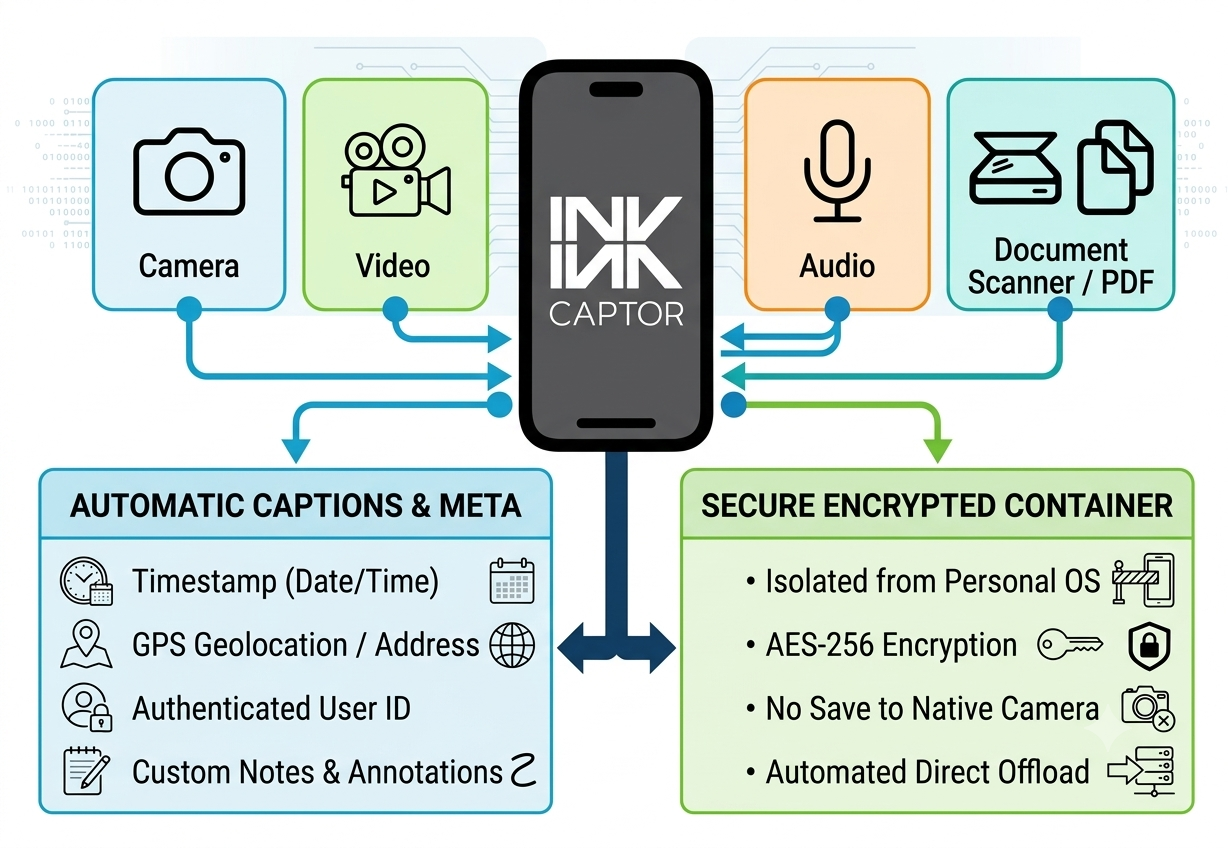
Why CAPTOR is the Perfect Fit for Industrial Use Cases
Automatic Metadata Watermarking: CAPTOR automatically imprints date, time, location (GPS/address/directional), username, and custom notes onto the image as a visible overlay, while simultaneously embedding this information cleanly into the EXIF metadata.
Complete Containerization & Data Isolation: Photos taken in CAPTOR are encrypted instantly on impact (AES-256) and stored inside a sandboxed container. They never touch the device's personal camera roll or personal cloud backups (like iCloud or Google Photos), making BYOD programs safe and compliant.
Built for Seamless Integration (Zero-SaaS Footprint): Your business data should stay your business data. CAPTOR integrates with leading enterprise mobility management (UEM/EMM) solutions—such as Microsoft Intune, Ivanti, and BlackBerry—and routes captured media directly to your existing enterprise servers (OneDrive, SharePoint, WebDAV, SMB, or SFTP).
All-in-One Field Tool: CAPTOR isn't just a camera. Field staff can switch seamlessly between capturing photos, recording video or audio notes, scanning multi-page paper documents to PDF, and adding annotations (arrows, redactions, text labels) directly in the field.
The Bottom Line: You can't base high-stakes business decisions or legal compliance on unverified photos saved to an employee's personal device. CAPTOR gives your field workforce the tool they need to quickly document their work, while giving IT and leadership absolute confidence in the authenticity and security of that data.